
Checklists & interviews
This page is for the people who run checklists and interviews (stewards: facilitators and checklist managers). For how a checklist looks to everyone, see Checklists.
Setting up a checklist
These settings are on a checklist added to a conversation. A Topic's own checklist is set up on the Topic; see Running interviews.
- Scope: choose Shared (one list for the conversation) or Per participant (one per person, with a participant list you edit). You can change it later; the change is confirmed, announced in the chat, and keeps current ticks.
- Controls conversation completion: off by default. Tick it to make this checklist gate the conversation. A conversation has at most one such checklist; switching asks first and is announced.
- Show who's done to participants: on a per-participant checklist, participants otherwise see only their own row and whether the group is done.
- Details (what counts as done): write what counts as done for each item. Changing the Details of a ticked item marks it Needs review; the editor warns you before you save. Everyone in affected conversations gets a note, and stewards get a notification naming the item.
The matrix
On a Topic's checklist page, press All interviews (matrix). Stewards see every interview side by side: interviewees down the side, items across the top. Each cell states its state in words (Done, Partly, Not yet, Parked, Needs review), not just colour.
- Filters: Interviewee, Item, State, Status, Group, Required / optional, and From and To dates. The multi-value filters are searchable: type to find a value and remove it with its ×. Clear filters resets them all.
- Drill in: open any cell for the evidence and the interview.
- Compare answers: see every interviewee's Answer to one item together.
- Export CSV / Export XLSX: exports the filtered view, with states and links into LEMA Chat, never quotes.
- Show previous scope: a read-only view of the list before a scope change.
Interviewees see only their own row, under Your interview (matrix), and never counts.
What each person sees
Each item has a Who sees this setting: Everyone, Facilitators only or Participants. A person's checklist shows only the items meant for them.
- Facilitators and above can switch between All items and Participant view to check what a participant sees.
- A Facilitators-only item is never asked by the interviewer and never counts toward an interview's coverage.
Interviewer instructions
Facilitators and above can write instructions the interviewer follows and participants never see:
- for the whole checklist, in Interviewer instructions at the top of the checklist (press Save guidance),
- for a section, under Instructions for the interviewer in the section's Edit details,
- for one item, under Instructions for the interviewer on this item in the item's Edit details.
There is no separate prompt per interview: the whole-checklist instructions apply to every interview on that checklist. See Where to configure an interview.
Confirming Answers and sending them to a Brain
- Confirm agent-drafted Answers in the live checklist, in the interview's Answers to confirm (n) list (with Confirm all), or in the close dialog. Confirming never sends anything to a Brain.
- Confirmed Answers appear in the conversation's Findings panel under Checklist Answers. Submit them one at a time, a selection, or all at once. Each row shows its own result ("Submitted to brain" or "Failed" with Retry).
- The Brain picker starts on the conversation's usual Brain and warns you if the Brain can be read by people who can't see the checklist. It doesn't block you: anyone who can read that Brain can read the Answer.
- An Answer arrives in the Brain already verified by the steward who confirmed or submitted it.
- Retracting an Answer withdraws its Brain records too.
Completing with gaps
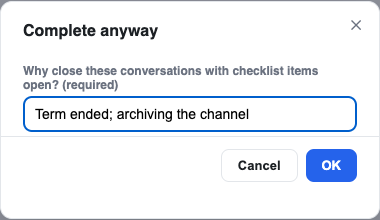
When a conversation's checklist still has open required items, a Facilitator or above can choose Complete anyway and must give a reason.
- The chat gets "Completed with gaps by name: reason".
- The audit log records which items were open.
- The conversation shows a Gaps badge in the left bar and "Closed with gaps" on the checklist. The ring keeps its real value.
- Reopening the conversation clears the badge.
Closing or cancelling a checklist
Close checklist makes it read-only while it still counts. Cancel checklist… needs a reason and stops it counting. Everyone sees a notice either way. Only a facilitator can reopen a cancelled checklist.
Interviews
An interview is a conversation guided by a checklist. For setting up Topics, starting interviews and steering them, see Running interviews; for the interviewee's side, see Taking an interview.
- Starting: an interview can start as soon as its checklist has any items, required or optional.
- Order: required items are covered first, optional ones after.
- Honest wrap-up: the interviewer closes based on what was actually covered. If something is missing, it says so ("We haven't fully covered Pricing model yet") rather than claiming everything is done.
- Ended with gaps: if the interview ends with required items uncovered, the chat says Ended with gaps and lists what is Still missing. It never shows "Interview complete" in that case.
- Adding more: a completed interview can be reopened with Add more detail. New material is added to the record, never replacing it.
- Per interviewee: each interview has its own checklist, showing that interview's own ticks. The Topic's checklist shows how all interviews are going ("covered by 3 of 5").