
API keys
A personal API key lets your own tools act as you in LEMA Chat. It is how you connect an outside client, such as Claude Code, Codex or a script, to your workspace without sharing your sign-in.
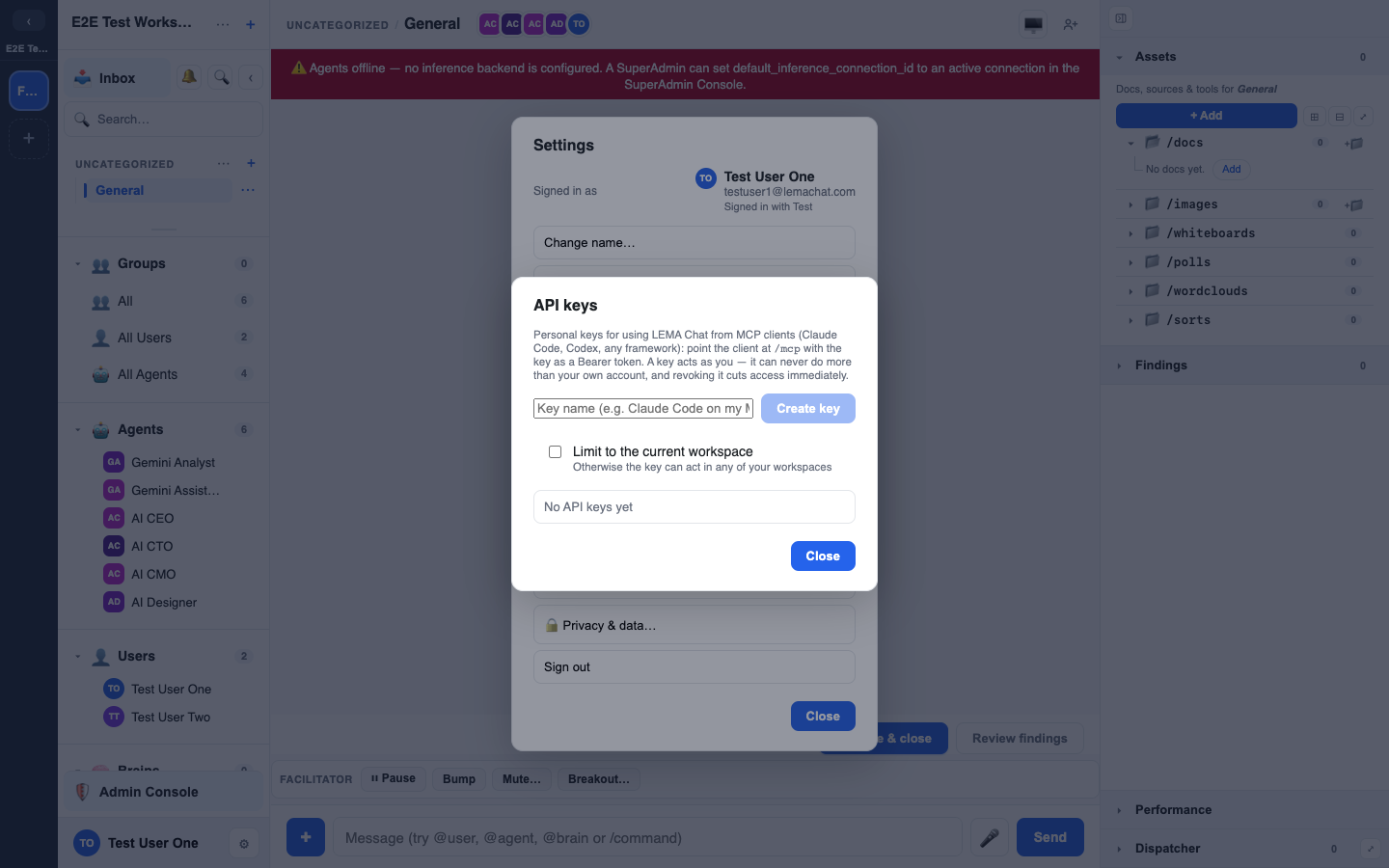
Creating a key
- Open Settings (your name or the ⚙ button, bottom-left).
- Choose Keys & connections (deep link:
/me/keys). - Under Create a key, give the key a name that says where you will use it, for example "Claude Code on my Mac", and press Create key.
- The full secret, which looks like
lcak_…, is shown once. Press Copy to clipboard and store it somewhere safe. It cannot be shown again.
Only a fingerprint of the key (a hash plus the last four characters) is stored, so LEMA Chat itself cannot show your key back to you later.
The key works in the workspace you were in when you created it. The dialog names that workspace. If you leave the workspace, the key stops working there.
Your keys
Your keys lists each key by name with its last four characters and its workspace. For each one you can:
- Rename it.
- Regenerate it: the old secret stops working and a fresh one is shown once.
- Revoke it: access is cut at once.
What a key can (and can't) do
A key authenticates as its owner. That means:
- It has exactly your memberships, roles and clearance, checked afresh on every request. A key can never do more than you can.
- If your access changes, or you revoke the key, that takes effect at once.
- It is tied to one workspace, so it cannot touch your others.
A key is a stand-in for you, not a master key. See Groups & roles.
Using a key
The most common use is connecting LEMA Chat as an MCP server to your tools. See LEMA Chat as an MCP server. You pass the key as a bearer token:
Authorization: Bearer lcak_...Calling the REST API: send Content-Type: application/json
The API is served from the same address you open LEMA Chat at, under /api. The examples here use your-workspace-host for that address.
If you call the REST API directly with a key (a script, curl, your own integration), every request with a JSON body must say so with the header Content-Type: application/json. The API is strict about this on purpose: it is part of its protection against cross-site request forgery.
A JSON body sent without that header, or with a different one, is refused with a 422 validation error, even if the JSON itself is valid:
{"detail":[{"type":"model_attributes_type","loc":["body"],
  "msg":"Input should be a valid dictionary or object to extract fields from", ...}]}
The usual culprit is curl -d on its own, which labels the body as a form (application/x-www-form-urlencoded). Always add the header:
curl -X POST https://your-workspace-host/api/courses \
  -H "Authorization: Bearer lcak_..." \
  -H "Content-Type: application/json" \
  -d '{"title": "Onboarding basics"}'
Most HTTP libraries set the header for you when you pass a JSON object (for example requests.post(url, json=...) in Python, or httpx's json=). If you build the body as a string yourself, set the header by hand. Endpoints that take form fields or file uploads are unaffected.
Deleting a chat: Trash by default, purge on request
DELETE /api/chats/{chat_id} moves the chat to the workspace Trash. The chat stays restorable until the Trash retention runs out (72 hours unless the workspace has changed it), or until someone empties the Trash. The response is {"ok": true, "trashed": true, "trash_url": "..."}. A second DELETE on a chat that is already in the Trash changes nothing and does not restart the retention clock.
POST /api/chats/{chat_id}/restore brings a trashed chat back. POST /api/chats/{chat_id}/purge deletes a trashed chat permanently; a chat that is not in the Trash answers 404 (delete it first). Its own files, docs, whiteboards and widgets go with it, as do the SideChats trashed with it. Purge needs the same permission as Empty Trash: a person. An API key acts as the person who owns it, so it may purge what its owner may. An agent, a read-only seat or a guest is refused with 403. Every purge is written to the audit log as chat.purge. The response includes {"ok": true, "purged": true}.
A ticket's chat is managed from its ticket, so a delete answers 409. A direct message can be archived but not deleted (409).
The same three routes work for every item that goes to the Trash: DELETE /api/<resource>/{id} moves it to the Trash, POST /api/<resource>/{id}/restore brings it back and POST /api/<resource>/{id}/purge deletes it permanently. The resources are:
chats,docs,canvas,widgetscommunities,communities/{community_id}/channels,checklists/templatesfoldersanddiscovery/topics(Topics),discovery/topic-groupsbrains2,brains2/records,brains2/{brain_id}/tools,tool-librarycourses,courses/{course_id}/nodes(unpublished items only)interviews,groups,workspaces/{workspace_id}/roles,workspaces/{workspace_id}/agentsapplications,integrations,connections
A large item, such as a Brain or a course, is deleted in the background: its purge answers with "result": "queued".
A Topic or connection that is still in use answers DELETE with 409 and "code": "in_use_choice", listing what uses it and the options you have. Send the DELETE again with ?mode=delete (take the dependents to the Trash with it) or ?mode=detach (leave them, marked as having a deleted source).
Your own keys and personal connections use your personal Trash: GET /api/me/trash, POST /api/me/trash/{id}/restore, POST /api/me/trash/{id}/purge and POST /api/me/trash/empty. A community post's delete can be undone with POST /api/communities/{cid}/channels/{chid}/posts/{pid}/restore. There are no ?purge=true or ?hard=true options. Archiving a doc or whiteboard is a separate action: POST .../archive and POST .../unarchive.
@-mentions in a message
POST /api/chats/{chat_id}/messages takes an optional mentions list, one entry per picked mention: {"kind": "user" | "agent" | "group" | "brain", "id": "...", "label": "..."}. label is the text after the @ in body (for example Haiku 4.5 for @Haiku 4.5). For kind: "agent", id may be either the agent's id or its user_id, both as returned by GET /api/workspaces/{workspace_id}/agents; the message records the user_id either way. An id from another workspace, or of a retired or removed agent, routes nobody; when body contains @<label> it is listed under that label in the response's mention_meta.misses ("unavailable", or "retired" for a retired agent).
Treat it like a password
Anyone holding your key can act as you within its scope. Don't paste it into shared files or commit it to a repo. Revoke and reissue if it leaks.
Key overview
Settings > Keys & connections > Your keys and connections lists every personal key and connection you own in one place, with its age, last use and health, and lets you rotate, test or revoke it. Values are never shown. See Key audit.