
Brains management
A Brain is the durable, curated knowledge a workspace accumulates.
- The org Brain is not one big store. It is made of smaller, access-scoped mini-brains.
- A Group Brain is a named set of member mini-brains.
- Knowledge stays visible only to the people cleared for it.
Where Brains are managed
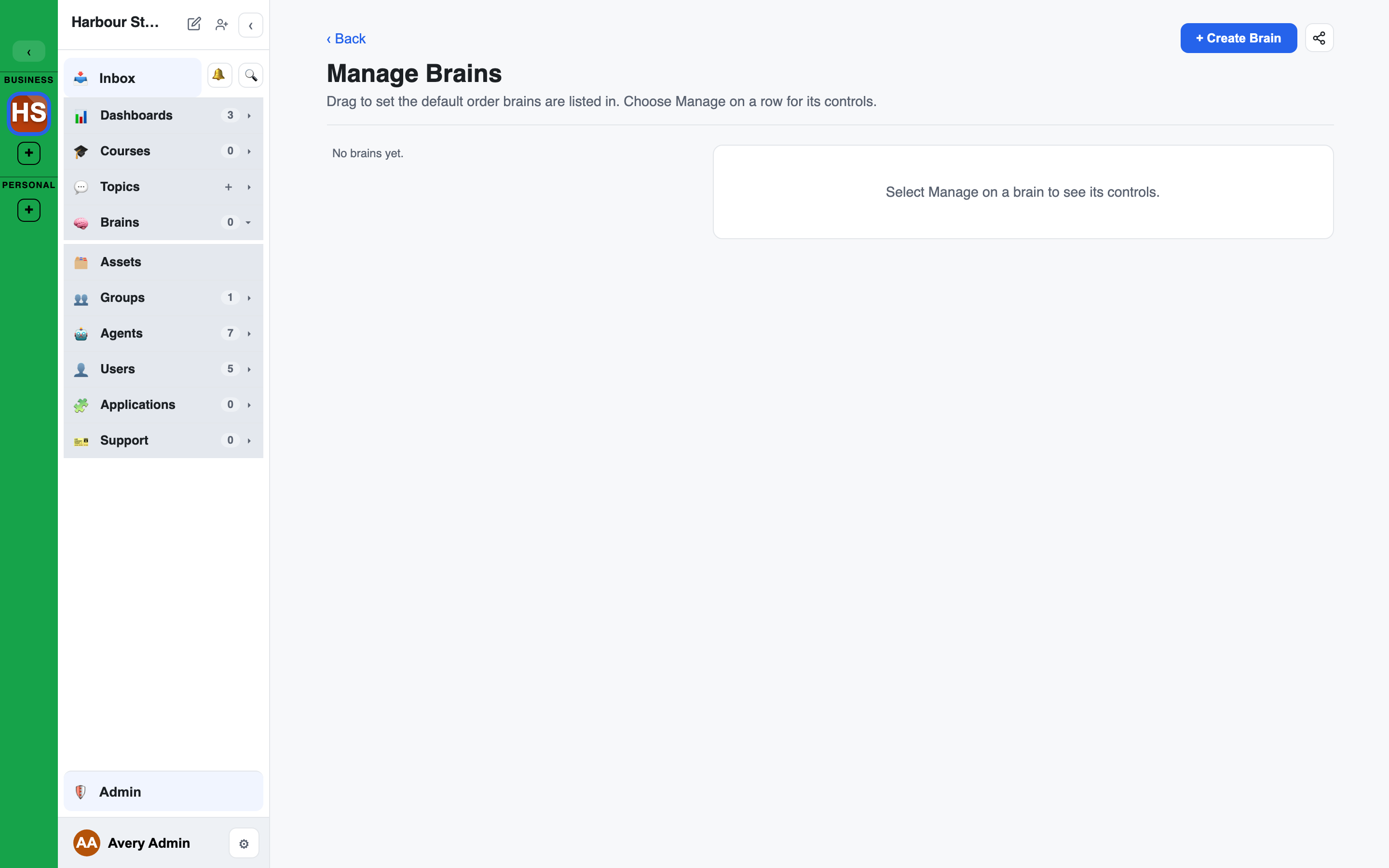
Brains are managed from the left sidebar, not the Admin console.
- Manage Brains: click the ⚙ on the Brains section header. The Manage Brains page opens in the main content area and lists every Brain in the workspace.
- Reorder: as a workspace admin, drag the handle on a row to set the workspace's default Brain order. It is saved on the server and used everywhere Brains are listed (the sidebar, pickers).
- Manage: each row has one control, which opens that Brain's detail pane: a summary, openers for each tab of its page (Records, Review, Access, Tools) and, if you can administer the Brain, its settings (rename, description, avatar, archive and unarchive, permanent delete). Someone who can only read a Brain sees the openers alone.
- Create Brain is in the page header for workspace admins.
- A Brain's page: click a Brain in the sidebar section to open its full page: records, the review queue, access, and tools.
Access is granted to groups, which is the clearance model described in Groups & roles.
The company Brain
The company Brain is the onboarding site's Brain. Every member can read it. Who writes it follows role and one setting, never a stored grant:
- Facilitators, Admins and Owners always read and write it, from the role alone: they need not have joined the onboarding site. They accept the findings others propose. Removing the role removes the access.
- Founders write it while Founders write to the company Brain is on (the default). Off, a Founder's findings stay proposed in the chat until a Facilitator accepts them.
- Agents, guests and API automation never get this write.
- Raising read to write never widens who can see the Brain.
The setting is on the Workspace page. If it is off while Facilitators cannot read private chats, a warning shows: nobody could approve a Founder's findings. See Founders and the company Brain.
Findings an Agent produced need a person's approval before they go into any Brain. The API keys approving findings setting decides whether an API key can give that approval. See Workspace settings.
Records, promotion, and versioning
- Promote to Brain: findings, docs, and whiteboards become brain records. On promotion, a record is embedded (vectorised) so it can be found by meaning, not just keywords.
- Semantic search runs over a Brain's records.
- Supersession: updating a record creates a version that supersedes the old one. History is kept, not overwritten.
- Verify and unverify: records can be marked verified, and a review queue lets a curator work through what has been promoted. See Verification and review.
Filtering records
The Records tab has a search box and a row of filters:
- Kind: any kind, or one of the kinds this Brain holds.
- Verified: any, verified, or not verified.
- Status: the record's status.
- Tag: shown to people who hold tags.
- Source: shown when the Brain holds records with a source tag. Records that came from an agent's work carry the Agent source, so you can list everything an agent contributed. Choose Any source to clear it.
- Review overdue: only records whose review is due.
Decisions
When a Brain holds decision records you can see, a Decisions: row appears above the filters: All, For, Against and Parked, each with its count. Pick one to list only those decisions.
A decision record's page shows its outcome, who decided it and its sources.
Verification and review
Verifying a record says "someone who can write this Brain has checked it". Each verification has a review cadence (Monthly, Quarterly, Annually, or No recurring review), so a record falls due for review when its cadence runs out.
Only people who can write to a Brain (its writers and admins) verify records or see this section. Readers never see review counts.
The amber badge
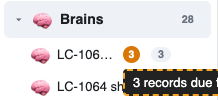
When records are overdue, the Brain shows an amber count in the left bar and on its page header, for example "3 records due for review" on hover. Click it to go straight to Review needed. Nothing shows at zero.
Flagging a record for review
Anyone who can verify a record can ask for it to be reviewed, for example a record an agent added.
- Open the record. Its Review section reads "No review requested" with a Flag for review button.
- Who should review it?: Anyone who can verify, a person, or a role. Only people who can verify records in this Brain are listed and notified.
- What should they check? (optional): a note for the reviewer.
- An open request shows who asked, Assigned to: and the note, with Change and Clear flag.
- Verifying the record completes the review.
Review needed
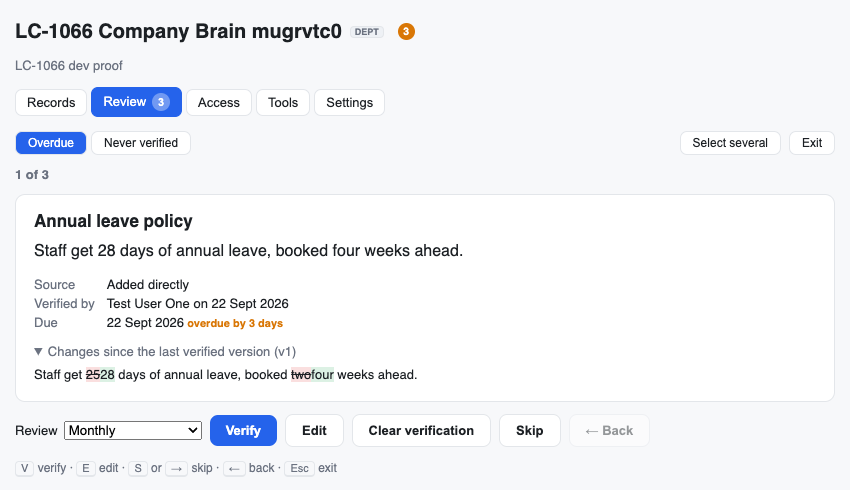
Review needed is a focused mode for getting through verification quickly. Open it from the badge, from a review reminder, or with the Review needed (N) button on the Brain page.
- The queues:
- Needs review (the default): flagged records first, then overdue ones.
- Overdue: records whose cadence has run out.
- Flagged: records someone asked to have reviewed.
- Assigned to me: flagged records assigned to you or to one of your roles.
- Never verified: records nobody has checked yet.
- One record at a time: its title, content, source, who verified it last, when it is due, and what changed since the last verified version. A flagged record also shows who it is assigned to.
- Actions: Verify (pick a cadence; a never-verified record starts at quarterly), Edit (saves a new version, then verifies it), Clear verification, Skip, Back. Progress reads "1 of 3".
- Keys:
Vverify,Eedit,Sor→skip,←back,Escexit. - Several at once: Select several, then Verify selected. Every row shows its result, and Retry failed re-runs any that did not go through.
Review reminders
LEMA Chat sends a bell digest to the people who can verify a Brain, for example "5 records in Company Brain are due for review". It opens Review needed on the overdue queue.
- It goes to whoever verified the record, if they can still write the Brain. Otherwise it goes to the Brain's owners and admins. Nobody without write access is notified.
- One digest per person, per Brain, per period. The platform default is weekly. A Brain's admins can change it under Brain > Settings > Review reminders (off, daily or weekly).
Checklist Answers arrive verified
An Answer submitted from a checklist arrives as "Verified by steward": the steward who confirmed or submitted it vouches for it. It uses the Brain's default review cadence, if it has one.
Restricted sources
A reader can read a record even when it came from an interview, chat or checklist they cannot open. They see "🔒 Source restricted" in place of the source, with no title or link.
Group Brains and mini-brains
- A mini-brain is an access-scoped store: the unit that groups are cleared on.
- A Group Brain combines several member mini-brains under one name, so a chat can draw on a coherent set of knowledge while each piece keeps its own clearance.
Brain tools
Agents in a chat can search and read the Brains that chat may use: search a Brain, list and read its records, see a record's history, and list what is due for review. These tools only read. The chat's groups decide which Brains are reachable, and every call is audited.
A Brain's Tools tab adds more:
- Bound integrations: bind an integration to the Brain with Bind integration, or remove it with Unbind. See Integrations & plugins.
- Curated tools: tools built on a bound integration's operations, each with a name, an operation, a parameter schema and a request template. Curated tools are retrieval-only: they read data through the integration and never change anything.
- Tools library: save a tool definition with Save to library and reuse it in other Brains with Use. Built-in templates are offered to every workspace.
The Brain MCP server
A read-only Brain MCP server ships separately (mcp/brain-mcp). It exposes list_brains, get_brain, search_brain, and get_record over stdio to any MCP client, talking to the running API. It reads and searches Brains; it does not write them.