
Trash and recovery
Deleting something moves it to the Trash. It stays there for a while and can be put back. A chat can also be resolved or archived, which makes it read-only without deleting anything.
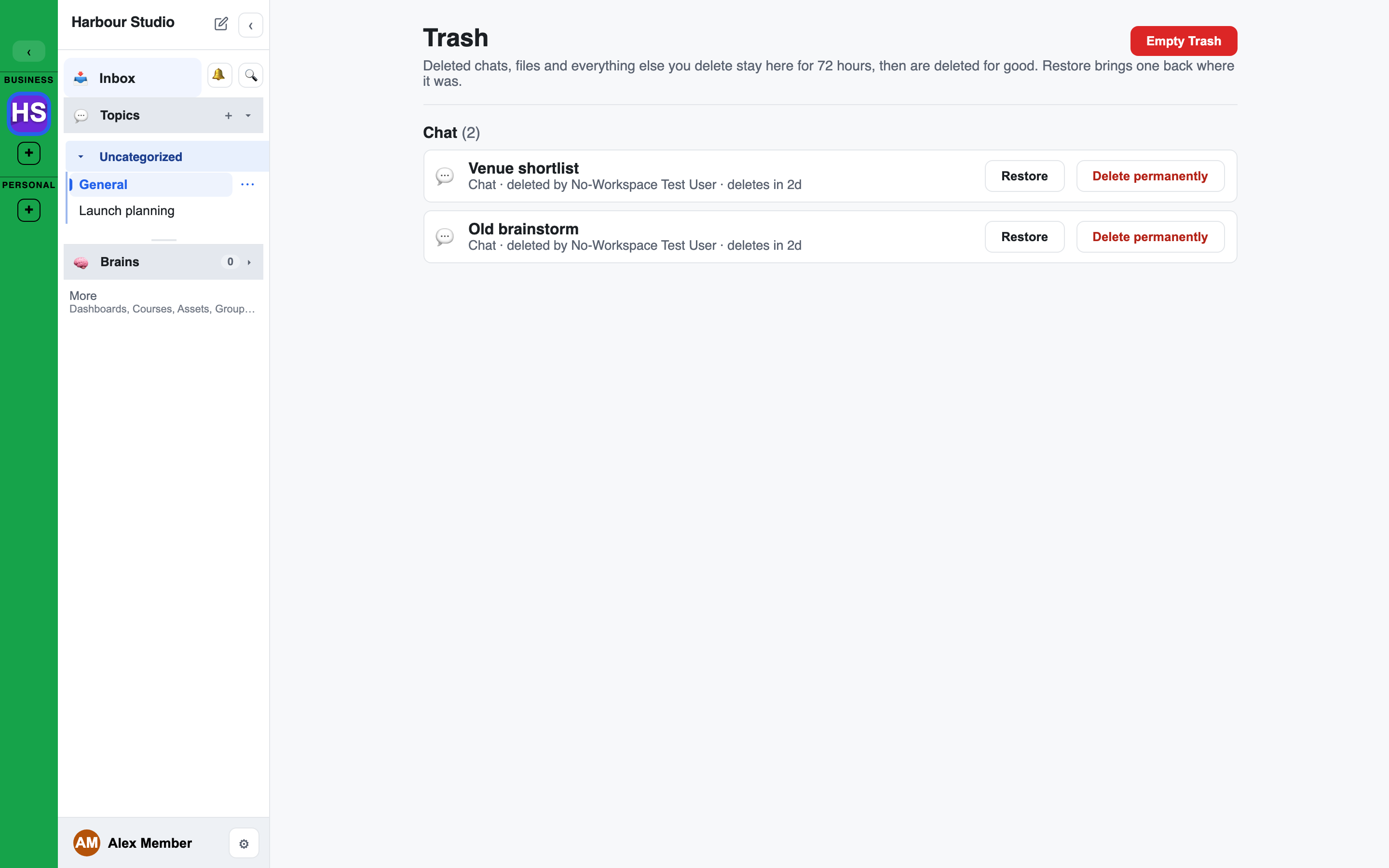
What goes to the Trash
Almost everything you can delete:
- Chats, with their files, docs, whiteboards and widgets
- Files, docs, whiteboards and widgets
- Topics (channels) and Topic groups
- Brains, Brain records and Brain tools, and tool templates
- Courses, and course items that have never been published
- Interviews
- Agents
- Groups and roles
- Communities and checklist templates
- Applications, integrations and workspace connections
Your own keys and personal connections go to your personal Trash instead.
A few things are deleted at once and never reach the Trash: quiz and link widgets, and support tickets. The confirm for those says it cannot be undone.
Deleting and Undo
Deleting asks first: "Move to Trash", with a note that you can restore the item from the Trash until it is permanently deleted.
Once it is moved, a message at the bottom of the screen says so, for example Moved "Plan" to the Trash., with an Undo button. Undo puts it straight back. The message stays for a few seconds; after that, use the Trash.
Deleting several items at once from the Assets panel asks once, and one Undo brings them all back.
A name is freed when you delete
An item whose name must be unique, such as an agent or a Topic, is renamed when it goes to the Trash: "Plan" becomes "Plan-DELETED" (then "Plan-DELETED-2", and so on). You can create a new "Plan" straight away.
Restoring it puts the old name back. If the name has been taken in the meantime, the item keeps its "-DELETED" name and the message says so.
Delete or Detach
A Topic still holding chats, or a connection still used by integrations, is in use. Deleting it asks what to do with the things that use it:
- Delete with them: the item and everything that uses it go to the Trash together, and come back together if you restore it.
- Detach: only the item goes to the Trash. The things that used it stay and keep working, marked Deleted source. Point at the mark to see what was deleted.
A connection's integrations cannot work without it, so for a connection the only choice is to delete them with it.
Opening the Trash
Open the Assets panel on the right of a chat, or the workspace Assets page, and click Trash. The link shows how many items are in it. The Trash has its own address, /trash.
The page groups items by kind. Each row shows the item's name, its kind, where it came from (for example the chat, or "in" the Brain it belongs to), who deleted it and how long is left, for example "deletes in 5h". A long Trash shows the newest items first, with Load more at the bottom.
You see only items you would be allowed to see if they were not deleted.
Restoring
Press Restore on an item. It goes back where it was, and the page confirms with "Restored" and its name.
An item that belongs to something else also in the Trash, such as a record of a deleted Brain, cannot come back on its own: restore the Brain first.
Deleting for good
- Delete permanently on a row deletes that one item for good, after you confirm.
- Empty Trash deletes everything in it that you are allowed to delete. You are asked to confirm, and it cannot be undone. Items you may not delete stay in the Trash, and the page tells you how many.
- A Brain is deleted for good only after you type its name.
- Large items, such as a Brain or a course with its chats, are deleted in the background. Their row shows "Deleting..." until it is done.
- An item still needed by something else shows "Cannot delete" and the reason. It stays in the Trash.
Only a person can delete for good. An agent cannot. An API key acts as the person who owns it.
How long things stay
Items stay in the Trash for the workspace's retention period: 72 hours unless an Owner or Admin has changed it, anywhere from 24 hours to 30 days. The top of the Trash page states the period. After that they are deleted for good.
While a whole workspace is in the Trash, the clock on the items inside it stops, and starts again when the workspace is restored.
Your personal Trash
Your own keys and personal connections are deleted to a Trash of your own: Deleted keys and connections in Settings > Keys & connections. Only you see it. It has the same Restore, Delete permanently and Empty Trash, and an item deleted for good takes its stored secret with it.
When a chat is deleted
A deleted chat goes to the Trash with everything that belongs to it:
- It disappears from the left sidebar, search, unread counts and notifications for everyone.
- Its own files, docs, whiteboards and widgets go with it. Items that live elsewhere and are only linked from the chat are left alone.
- Its SideChats go with it, and come back with it.
- A live or paused interview in it is closed. The interview stays private.
- It is read-only: nobody can post, upload, rename or add a SideChat.
- Only the person who created it and facilitators can still open it, see it in the Trash, restore it or delete it for good.
Restore puts it back the way it was: open, closed or archived, with its files and SideChats. A chat whose Topic has been archived in the meantime cannot be restored until the Topic is unarchived.
If a chat is moved to the Trash while you have it open, you see "This chat was moved to the Trash" and a button back to the workspace overview.
A direct message cannot be deleted, only archived.
When a group is deleted
A chat that only a group could see is closed while that group is in the Trash: only Owners and Admins can open it, and a notice says why. Restoring the group reopens the chat to its members.
If the group is deleted for good, Owners and Admins see Release hold on the chat. It opens the chat to everyone its Topic allows, agents included.
Resolved and archived chats
A chat that is resolved or archived stays where it is and can still be read. The box where you type is replaced by a bar:
| The bar says | What it means | The button |
|---|---|---|
| "This chat is resolved." | It was resolved. The bar names who resolved it and when. | Reopen |
| "This chat is archived." | It was put away. | Unarchive |
| "This chat is read-only." | Something else holds it closed. The bar says what. | none |
Who can use the button:
- Reopen: members who can post in the chat.
- Unarchive: the person who created the chat, or a facilitator. Either person in a direct message can unarchive it.
When you cannot act, the bar says why, for example:
- "Its parent chat is resolved. Reopen the parent first."
- "It was archived with its parent chat. Unarchive the parent to restore it."
- "Its ticket controls it."
- "It is in the Trash. Recover it to post again."
In a resolved or archived chat, messages cannot be edited or deleted, and waiting approval cards cannot be approved.
Reopening a chat that was resolved shows a banner with Undo reopen.
An archived workspace
When a whole workspace is archived, every chat in it shows "This workspace is archived: everything is read-only until an Owner or Admin unarchives it."
Workspaces of your own that are in the Trash are listed under Trashed workspaces… in Settings.